The table on this tab, in Excel.
Unzip, Load unpacked in Chrome. This zip includes Pro. It is not in the Chrome Web Store.
How it works
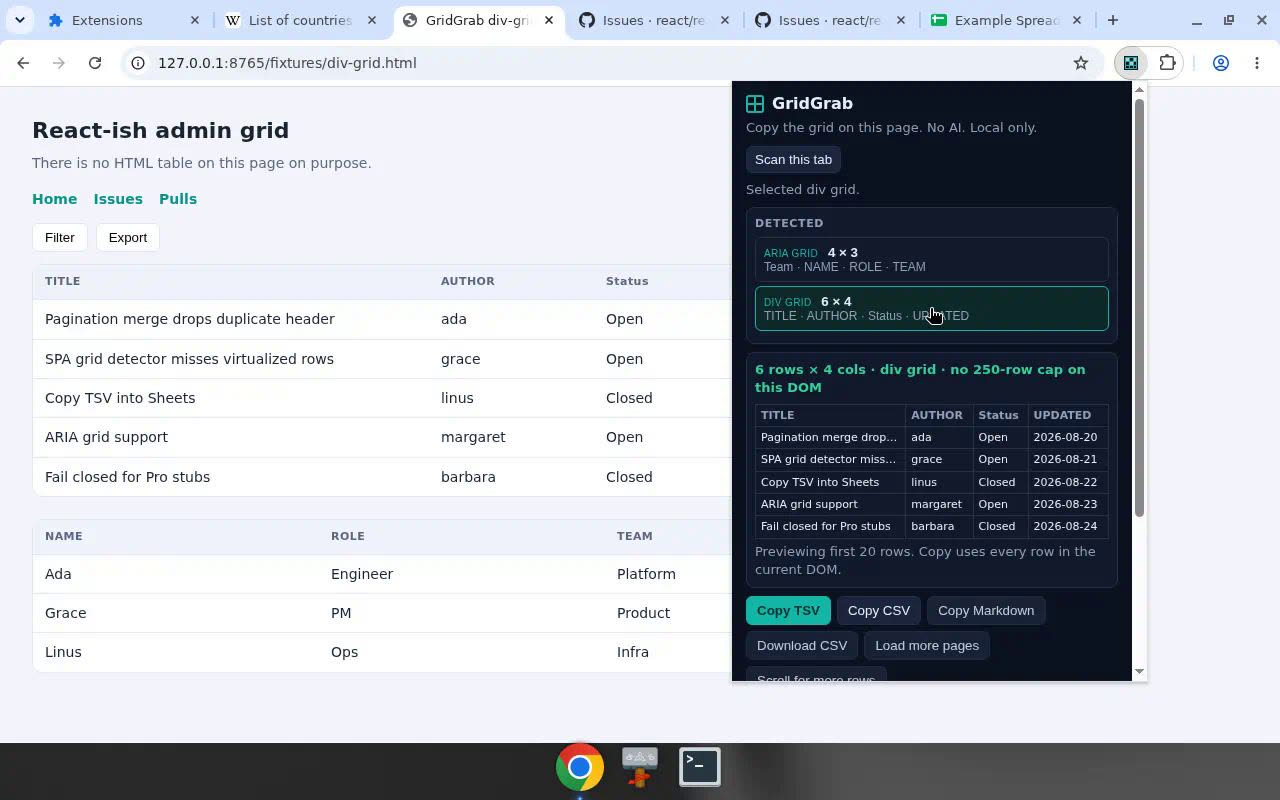
Open the page with the grid. Click the GridGrab icon. It detects an HTML table, a SPA / div grid, or an ARIA grid on the current tab. You get a preview. Then copy TSV for Excel or Google Sheets, or copy CSV / Markdown, or download a .csv. There is no row cap.
- Click the GridGrab icon on the tab in front of you.
- It finds the HTML table, SPA / div grid, or ARIA grid.
- Check the preview.
- Copy TSV, CSV, or Markdown — or download .csv.
Who it is for
Anyone who keeps pasting half a table out of an admin UI. Also wiki tables, and SPA dashboards that never expose a real HTML table.
- Admin UIs that hide rows in nested divs.
- Wiki and docs tables you need in Excel tonight.
- SPA dashboards that look like a spreadsheet and copy like a screenshot.
Copy an HTML table to Excel
If the page has a real HTML table, GridGrab reads it on the current tab and copies TSV. Paste into Excel. Columns stay columns. There is no row cap on that copy.
Copy a SPA / div grid to Google Sheets
Most admin tools are not HTML tables. They are div grids. GridGrab treats those SPA / div grids — and ARIA grids — as the thing you meant to copy. Copy TSV, paste into Google Sheets. Same as Excel.
It is not a scrape of a Google Sheets /htmlview iframe. If you are sitting inside Sheets, use Sheets. GridGrab is for the grid on the page in front of you.
ARIA grids
If the page exposes an ARIA grid, GridGrab looks for that too. Same preview. Same TSV / CSV / Markdown. Same no row cap.
What’s in the zip
- The extension folder ready for Load unpacked.
- Pro included — no license key, no free-tier gate on the Gumroad build.
- Works offline after install. Local only.
Chrome extension: Load unpacked
This is a Chrome extension you sideload. It is not a Chrome Web Store listing. Chromium only.
- Buy and download the zip from Gumroad.
- Unzip it somewhere permanent (not Downloads if you empty that folder).
- Chrome → Extensions → turn on Developer mode → Load unpacked → pick the unzipped folder.
- Open the page with the table. Click the GridGrab icon. Copy TSV for Excel/Sheets, or CSV / Markdown / download .csv.
What you get
- Finds HTML tables, SPA / div grids, and ARIA grids on the current tab.
- Copy TSV for Excel and Sheets, CSV, Markdown, or download .csv. No row cap.
- Click Next to merge pages, or scroll to merge infinite lists.
- Permissions: activeTab, scripting, storage.
Why $19 one-time
Table Capture and CopyTables-style tools often live in the Chrome Web Store and charge a subscription, or gate the useful export behind a free-tier row cap. GridGrab is a $19 zip. Pro is in that zip. No license key. No monthly plan. You Load unpacked. You keep it.
The trade is honest: not on the Chrome Web Store, Chromium only, one payment.
Honest limits
- Not in the Chrome Web Store. You Load unpacked with Developer mode on.
- Chromium only. We document Chrome. This is not a Firefox or Safari add-on.
- Google Sheets /htmlview iframes can miss rows. This is not a Sheets iframe scrape.
- GitHub Issues lists and tables can miss rows. This is not a GitHub Issues scraper.
14-day refunds are listed under Refunds. How the zip arrives: How delivery works.
Questions
How do I copy an HTML table to Excel?
Open the page with the table. Click the GridGrab icon. It detects the HTML table on the current tab, shows a preview, then you copy TSV and paste into Excel. There is no row limit.
Can GridGrab copy a SPA or div grid to Google Sheets?
Yes. GridGrab reads SPA / div grids and ARIA grids on the current tab, not only HTML tables. Copy TSV and paste into Google Sheets. It is not a scrape of a Google Sheets htmlview iframe.
Does GridGrab read ARIA grids?
Yes. It looks for HTML tables, SPA / div grids, and ARIA grids on the current tab. Same preview. Same TSV, CSV, or Markdown copy. Same no row limit.
Does GridGrab need a license key?
No. The Gumroad zip includes Pro. No license key. No free-tier gate on that build.
Is GridGrab on the Chrome Web Store?
No. GridGrab is not in the Chrome Web Store. Unzip the folder and Load unpacked in Chrome, Chromium, or Edge with Developer mode on. Chromium only. We do not install it from the Chrome Web Store for you.
Does GridGrab copy Google Sheets from an iframe?
No. This is not a Sheets iframe scrape. GridGrab copies HTML tables, SPA / div grids, and ARIA grids on the current tab. Google Sheets htmlview iframes can miss rows.
Can GridGrab scrape GitHub Issues tables?
No. This is not a GitHub Issues scraper. GitHub Issues lists and tables can miss rows. GridGrab is for the table or SPA grid on the current tab.
Is there a row cap?
No. There is no row limit. Copy TSV for Excel and Sheets, CSV, Markdown, or download .csv. Use Next to merge pages, or scroll to merge infinite lists.
Why is GridGrab $19 one-time instead of a subscription?
The Gumroad zip includes Pro. No license key, no free-tier row limit, no monthly plan. Table Capture and CopyTables-style tools often live on the Chrome Web Store and charge a subscription. GridGrab is a $19 Load unpacked zip you keep. Chromium only. Not in the Chrome Web Store.
Updates?
Same SKU updates are included when a new zip ships to this Gumroad product.
Refunds?
14-day refund via Gumroad receipt reply if Load unpacked rejects the folder with manifest.json on current Chrome/Chromium/Edge (and Developer mode was on), or the zip cannot Copy TSV on a normal HTML table (e.g. Wikipedia) after Load unpacked. Not covered: Sheets iframe, GitHub Issues, Firefox/Safari, "I don't want to sideload."
Logging vendor invoice PDFs from Gmail into Sheets instead? See Invoice Inbox.